
New tech tools without the onboarding: How AI can help break blockers

Last Updated Aug 20, 2026
Kacie Goff
Contributing Writer
99 articles
Kacie Goff is a construction writer who grew up in a construction family — her dad owned a concrete company. Over the last decade, she’s blended that experience with her writing expertise to create content for the Construction Progress Coalition, Newsweek, CNET, and others. She founded and runs her own agency, Jot Content, from her home in Ventura, California.
Huge swaths of the construction industry have digitized over the last decade, many propelled by the efficiency gains tech delivers. Still, software adoption often stalls, hitting the same barrier time and again.
That blocker? The learning curve. Training team members how to use the tech typically requires time and effort.
AI is no exception here. People might push back on artificial intelligence, thinking it’s yet another tool they have to figure out. But it can actually be an assistant that makes their work life easier from day one.
Table of contents
From training sessions to ‘turn it on’
Construction is moving faster than ever before. Field teams don't have hours to sit on software training calls. They don’t have time to comb through user guides to apply that tech on the job, either.
These hurdles often mean workers continue doing things like they always have, maybe using a patchwork of point solutions or no tech at all. This doesn’t just mean losses on the efficiency front. It also means the company misses out on documentation and data capture that can drive insights.
AI gives GCs the potential to shift how tech gets rolled out to their teams. Instead of forced training sessions and inflexible workflows, they have the opportunity to let workers organically discover what AI can do for them. Embedding AI agents directly into existing software layouts minimizes blockers between the worker and using the tool.
Adoption in action: Haskell
Haskell is an integrated AEC design-build firm committed to staying on the leading edge. And they recently deployed AI on a major project.
You might think that means their team spends lots of time (potentially begrudgingly) in tech trainings. You could be picturing granular user guides that may or may not be followed, and mixed adoption resulting in different outcomes across the firm.
But with its efforts to deploy AI, Haskell took a different tack, explains Hamzah Shanbari, the Director of Innovation at Haskell, explained during Procore's Innovation Summit.
Haskell embedded AI directly into their work so they didn’t have to onboard anyone.
By simply putting QR codes up on the jobsite connected to the project’s AI agents, Shanbari says they let people’s natural curiosity drive adoption. And it worked.
How to deploy AI with near-zero friction
This might all sound a bit fantastical (after all, you’re reading this on a software company’s website—it’s in our best interest to make this sound easy).
But when AI agents are at the ready to help your team do their jobs, you don’t need to worry about onboarding.
Once your team sees how AI can help them and where it’s specifically useful, adoption grows organically.
Here are a few tips to help you get AI into your team’s hands with minimal resistance.
Embed the AI into the tools your team is already using
They shouldn’t need an extra login credential or added clicks to start using it. Make AI readily available in their existing workflows.
Make it feel familiar
A chat window, for example, might be something they already use when contacting their utility company or getting help with an online purchase.
When the interface doesn’t feel new, you remove an adoption barrier: the hassle of learning to navigate a new menu.
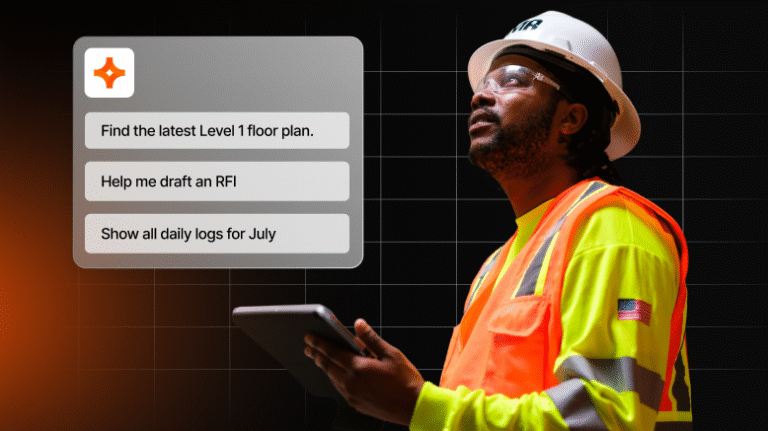
Give them sample prompts to get them started
If your team isn’t already using AI in their personal lives, they could have a hard time picturing how it could help them do their jobs. You might hang a poster on the jobsite with a few suggestions:
- Ask AI: "What are the specific submittal and warranty requirements for the roofing membrane on this project? Pull up the exact section in the specs and show me the source drawing if available."
- Ask AI: "Take these raw bullet points from today's shift and format them into a structured daily log report: 12 guys from concrete sub poured the slab on grade, inspector arrived at 10 AM and signed off, weather delayed crane setup for 1 hour in the morning. Clean it up, separate it by trades, and list the milestones clearly."
- Ask AI: "Create a high-priority safety observation for the fourth-floor west corridor. The temporary guardrail is loose. Assign this to the drywall subcontractor and attach the photo I just took."
- Ask AI: "Review the structural framing plan on sheet S-202 and cross-reference it with the HVAC layout on M-104. There’s a conflict with duct clearance near column grid line C-4. Draft a clear, formal RFI asking the structural engineer for a revised detail, keeping it professional and aligned with standard project procedures."
Make it well-rounded
If your tech platform has the capability, activate voice functionality for hands-free access.
Also, make sure the AI connects to the camera feature of the worker’s mobile device so they can ask questions about what they’re seeing.
Let it be flexible
It's great to start with sample prompts, but keeping tools flexible can help team members create custom informal workflows and become even more comfortable the tools in their daily practice.
Unlocking adoption with first-hand experience
True tech adoption doesn’t happen when a team member has completed a training or successfully logged into the app. It happens when that employee sees how that tool can genuinely help them.
If they can use AI to shave 10 minutes off a routine look-up task or an hour off a submittal review, they’re much more likely to revisit AI in the future.
Embed artificial intelligence into the tools your team is already using and make it available on the jobsite. Then, let your team play with it to see how it can work for them.
To help adoption spread, capture wins. If someone in the field uses AI to pull up a spec within seconds, log that. Then, make it a point to share successful AI use regularly (e.g., at weekly meetings). Instead of forcing your team to sit through tech onboarding sessions, you’ll show them where AI can help lighten their load. That puts the power in their hands, encouraging natural, frictionless adoption.
Was this article helpful?
Scroll less, learn more about construction.
Subscribe to The Blueprint, Procore’s construction newsletter, to get content from industry experts delivered straight to your inbox.
By clicking this button, you agree to our Privacy Notice and Terms of Service.
Categories:
Written by
Kacie Goff
Contributing Writer | Procore Technologies
99 articles
Kacie Goff is a construction writer who grew up in a construction family — her dad owned a concrete company. Over the last decade, she’s blended that experience with her writing expertise to create content for the Construction Progress Coalition, Newsweek, CNET, and others. She founded and runs her own agency, Jot Content, from her home in Ventura, California.
View profileExplore more helpful resources
What I Learned the Hard Way: Fred Mills on Changing the Narrative of Construction
Fred Mills, founder of The B1M, set out to change how the world sees construction. What began as an ambitious idea on a Post-it note grew into one of the...

Does your asset management workflow actually work?
Every fixed asset installed on a project generates data long before handover. Is your team capturing it as it happens, or scrambling to reconstruct it after the fact? That question...

From spec book chaos to single source of truth
Picture this: An expansion is going in directly beside a high-volume line that cannot stop producing. Structural steel lands in March, mechanical completion is promised for August, and your only...
The hidden risk of relying on your EPC partner for project visibility
Many owners have thought some version of “We don’t need a capital project management platform — our EPC partner manages all of this for us.“ It’s a reasonable position. Your...
Free Tools
Calculators
Use our calculators to estimate the cost of construction materials for your next project.
Templates
Find a template to help you with your construction project tasks.
Material Price Tracker
Get the latest U.S. retail prices and view historical trends for common building materials.
Glossary
Explore key terms and phrases used in the industry.