Procore Company Logo
Contractor inspecting a site
Orange hexagon

Construction photo documentation software

Document construction progress easily with unlimited photo storage

Streamline jobsite documentation by enabling teams to capture, organise, and share project images securely from any device, enhancing collaboration and reducing potential disputes.

Document every step of the construction process with project photos

Capture, store and share unlimited project photos in a secure online archive. Upload from any device, easily organise, and add markups and comments to align your team.

Learn more
icon_data illustrated icon

Store unlimited photos

Keep as many photos as desired within Procore’s cloud-based construction project management platform. We don’t charge by megabyte or gigabyte, ensuring all your project images are safe and backed up.

icon_devices illustrated icon

Capture from any device

Seamlessly take photos from your smartphone, tablet or computer. This flexibility ensures you can document progress no matter where you are on the worksite.

icon_chat illustrated icon

Mark up for clarity

Add details and comments directly onto your photos. This improves communication and ensures everyone understands specific issues or progress points.

icon_Project Management illustrated icon

Organise project photos

Quickly find the exact images you need for immediate project context and reference. Keep your digital photos neatly organised within the platform.

A woman contractor taking a picture of a construction site with her phone

Mitigate damage claims

Protect your margins with a visual audit trail

Record installation details with comprehensive high-resolution storage. Access the visual evidence needed to resolve disputes and verify quality before approving payments.

  • Safeguard records with reliable cloud-based backups.

  • Centralise photo access from the site or the office.

  • Eliminate hidden storage fees for project data.

  • Build an organised archive of every construction stage.

Explore Variations
A contractor looking at a construction site while holding a tablet

Drive site transparency

Verify work completion with GPS-stamped records

Control site visibility and prove progress with granular permission settings. Provide stakeholders with the evidence they need to approve commercial claims.

  • Verify installation locations with GPS-stamped imagery.

  • Align teams with targeted photo-sharing settings.

  • Safeguard project data by restricting unauthorised views.

  • Protect client confidentiality with precise access controls.

Explore Defect List
A construction worker using a phone on site

Protect project payments

Accelerate reporting to get paid faster

Prevent payment delays by providing visual evidence for every application for payment. Link site photos to reports in near real-time to keep the project programme moving forward.

  • Prove work completion for faster payment cycles.

  • Inform stakeholders with automated site updates.

  • Simplify collaboration by sharing images via email.

  • Capture progress on the go to avoid reporting delays.

Explore Site Diary
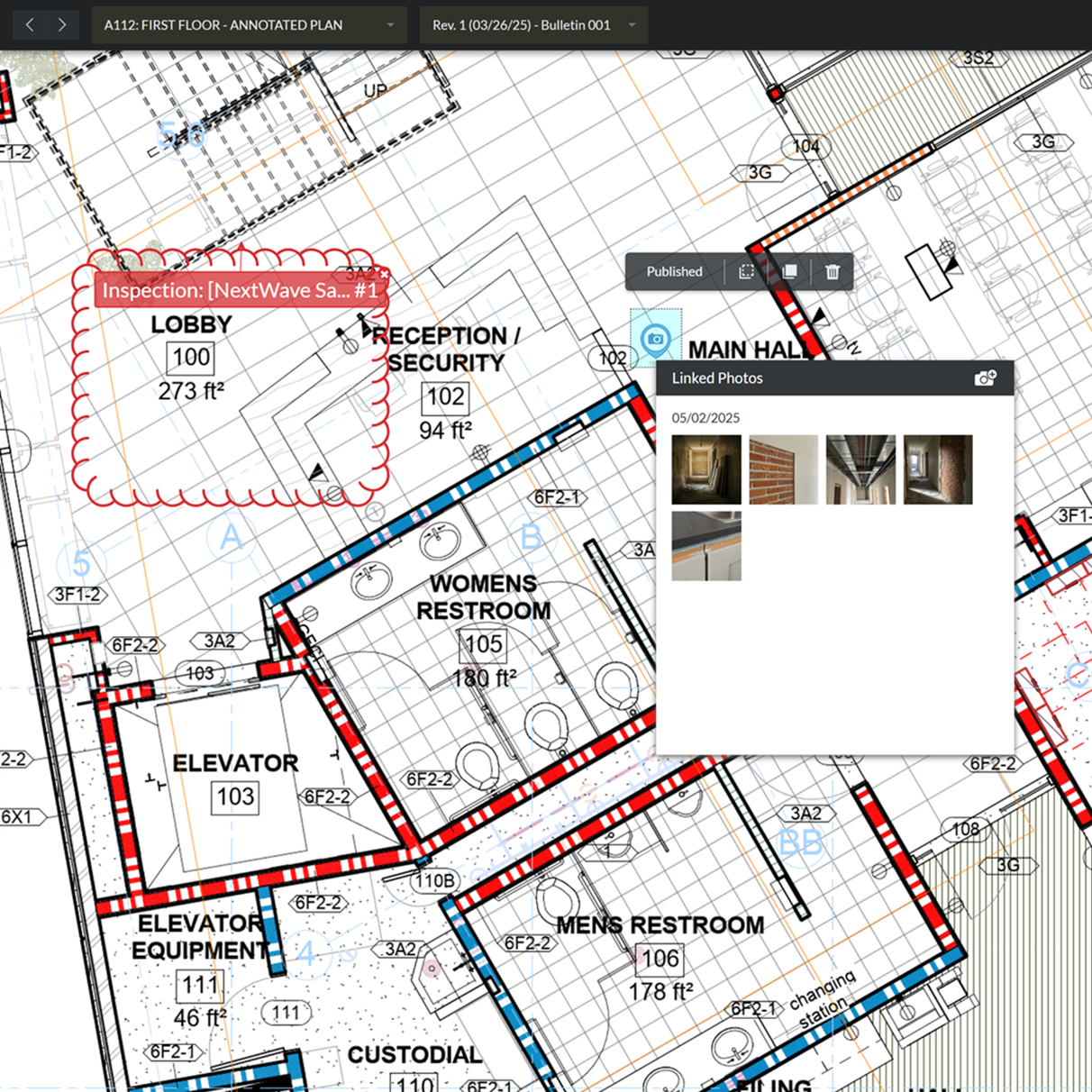
a digital floor plan, with an overlay indicating an "Inspection" and linking to "Photos."

Map site reality

Connect site imagery to project drawings

Link progress photos directly to your drawings for clear spatial context. Find the evidence you need by selecting specific locations on your site plan.

  • Organise site photos by linking them to drawings.

  • Find evidence quickly with drawing-based navigation.

  • Verify site progress with connected record updates.

  • Track quality across the site with pinned imagery.

Explore Maps
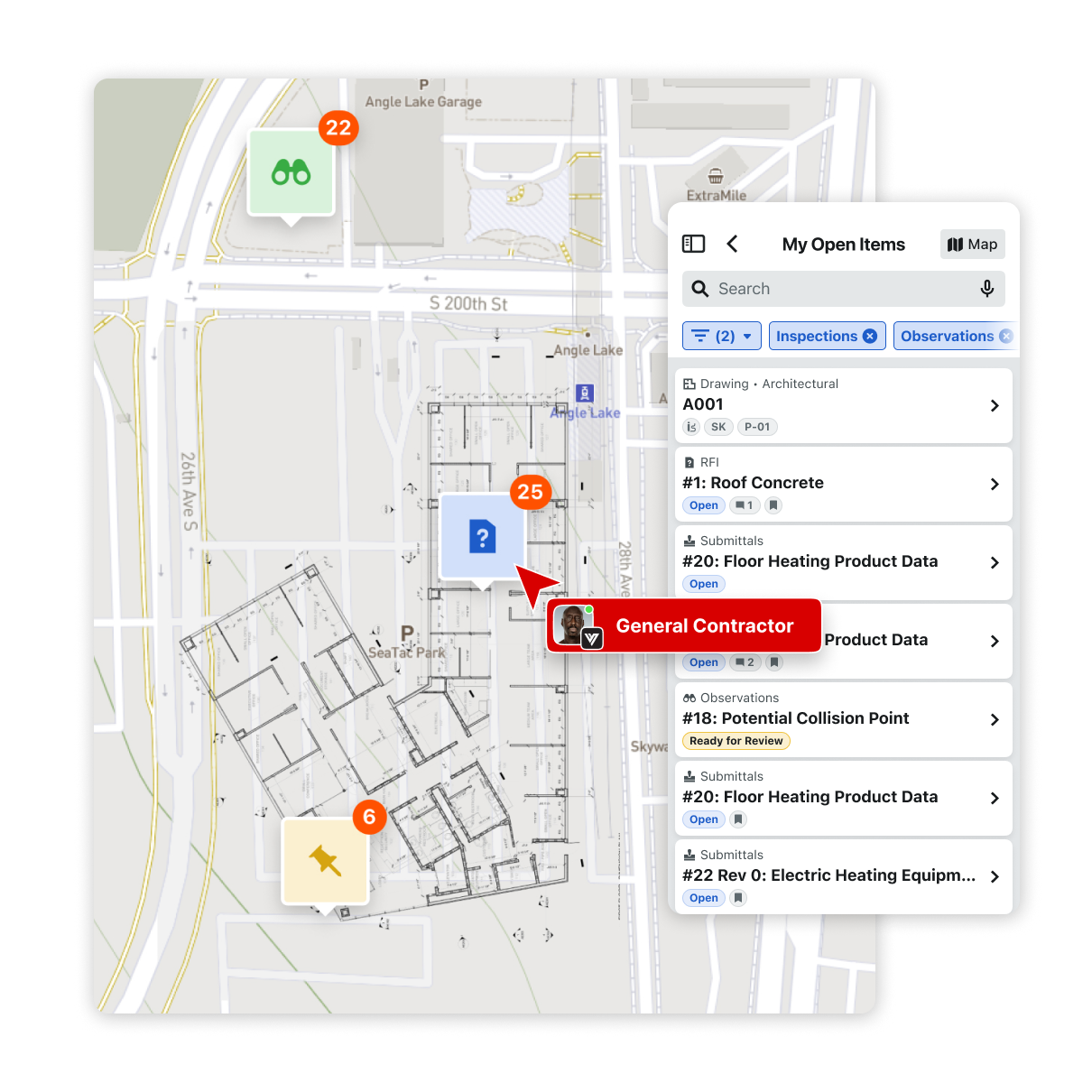
Procore's Maps tool screens

Meet building regulations

Drive compliance with location-stamped as-built records

Meet the evidence requirements of Part L (2021) without the burden of manual tagging. Capture geotagged photographic evidence of as-built details directly within the Procore app.

  • Record geotagged as-built details to meet Part L standards.

  • Reduce manual workarounds using third-party stamping software.

  • Deliver definitive proof of installation location to stakeholders.

  • Reduce rework by verifying photos meet reporting requirements.

  • Streamline submission processes with integrated location stamps.

Explore Inspections
Two contractors pointing up at a construction

Customer Story

With Procore it’s instant, right from the mobile app.

Dustin Burns

Vice President of IT

McCownGordon

Tap into 500+ integrations and apps you love working with

If we don't build it, chances are, there's an app or integration for it on our marketplace. So you can work the way you want to, all without ever leaving Procore.

Explore all integrations

Bring more of your work together

See how connected solutions work together to support every stage of construction and help teams build with confidence.

Project Execution

Build confidently on a single platform that seamlessly connects office and site.

Learn more

Cost Management

Drive predictable outcomes with real-time visibility into project financials.

Learn more

Resource Management

Boost your bottom line by optimising every site team, hour and piece of equipment.

Learn more

Project Lifecycle Management

Unify budgets, contracts and site progress into a single source of truth.

Learn more

FAQ

You can use intelligent site search within the Procore platform to retrieve specific imagery in near real-time. By entering queries such as "installed plasterboard" or "reinforcement bar," Procore’s integrated photo recognition identifies relevant visual tags and metadata. This saves site managers hours of manual filtering and helps ensure that evidence for quality control or damage claims is accessible when it’s needed most. This capability turns a massive repository of images into a searchable, connected database that supports data-driven decision-making.

Yes. Every photo captured via the Procore mobile app includes metadata recording GPS coordinates, date and time. Furthermore, you can apply definitive location stamps directly to the photo itself using the Procore camera. This is vital for complying with Part L (2021) of the building regulations, which requires geotagged photographic evidence of as-built construction details. By embedding this information directly on the image, you provide stakeholders and Building Control officers with the transparency they require, minimising the risk of unverified site records. This native functionality removes the need for third-party software workarounds and supports a high-integrity audit trail.

Photo documentation is a fundamental component of maintaining the "Golden Thread" of information required by the Building Safety Act. By capturing high-resolution, time-stamped evidence of firestopping, structural elements and other safety-critical installations, you build a digital record that is accurate and accessible. Procore helps safeguard this data in a central environment, allowing dutyholders to demonstrate compliance during every Gateway. This definitive record protects residents and provides clear accountability for every contractor and designer involved in the project, helping to verify that safety standards are met throughout the lifecycle.

Photos link to your daily site diary when you select the "Add to Site Diary" toggle during the upload process. This helps verify that your progress reports are backed by visual proof, reducing the risk of commercial disputes and ensuring that subcontractors are held accountable for their work packages. Automated report generation allows you to provide stakeholders with a comprehensive visual narrative of the project's evolution without manual data entry. This directly improves site productivity, helps keep the programme on track and protects project margins from unverified claims.

Get started now

If you can send an email, you can use Procore. Streamlined construction is really that simple.

4.5(2,659)

4.6(44K)

3.8(3,100)

4.6(4,167)