Dispatch is where the plan meets reality. A crew member calls in sick, a job wraps early, and someone has ten minutes to figure out who's actually free to fill the gap. Too often, that answer comes from a whiteboard, a spreadsheet, or a mental tally that's already out of date the moment it's written down. The person who looks open on paper might already be spread across two other jobs or the equipment needed for this job might be sitting on another jobsite. The best-qualified worker or available equipment for the task doesn't come to mind, because there's no way to search for them when you have just a list of names.
Procore helps remove the guesswork, and the searching that comes with it.
What's new
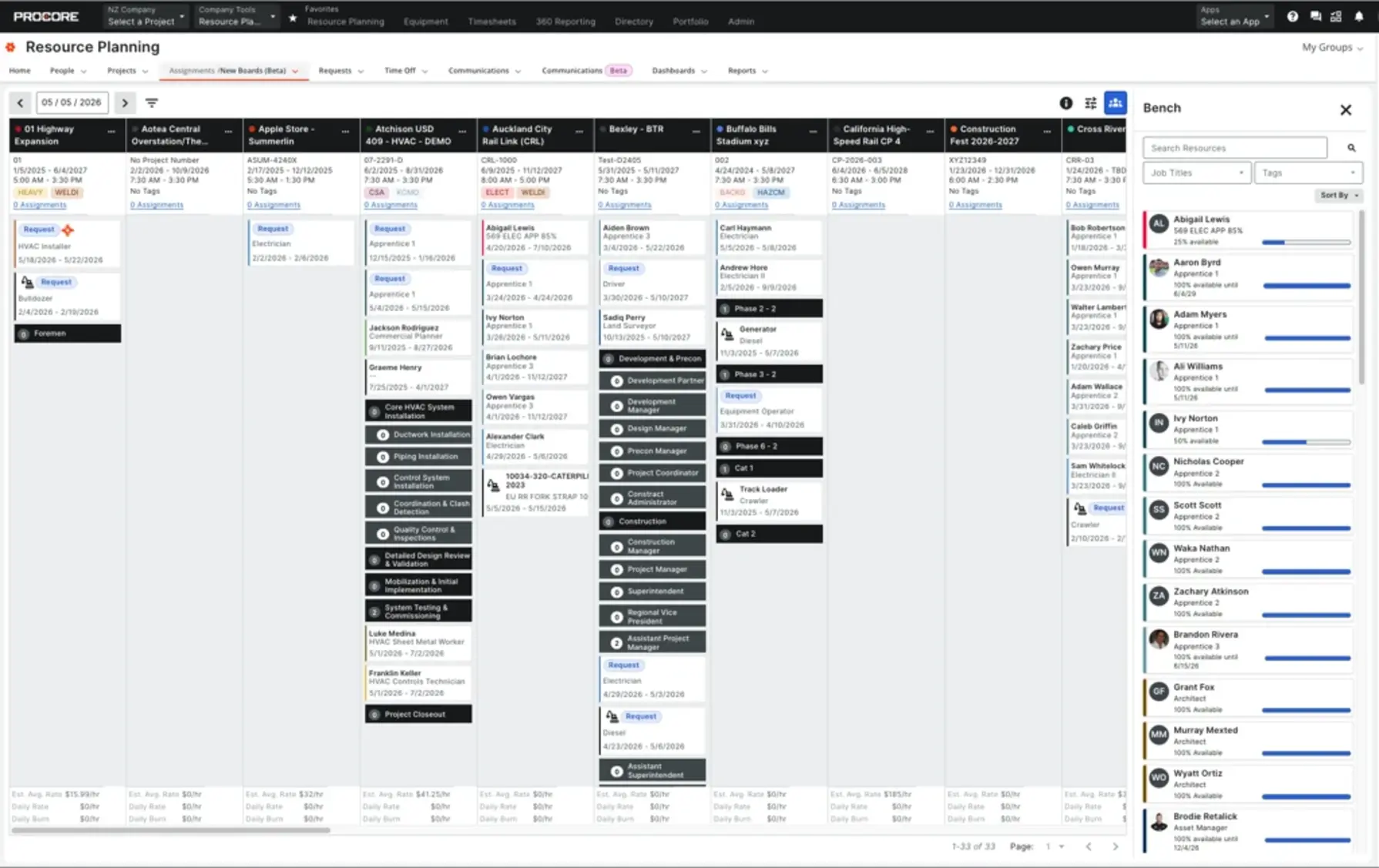
The modernized Procore Boards gives dispatchers, superintendents, and workforce planners a single visual page to assign labor and equipment to every job. At the center of the update is SmartBench, an AI-powered ranking assistant that surfaces the best fit for an open slot instead of leaving you to scroll a flat list of names.
Why it matters
Get ranked matches, not a flat list. SmartBench orders available people by skill and tag match, availability, and proximity to the job - according to your data – so the strongest candidate for an open slot surfaces first.
See true availability. Boards now totals a person's workload across every assignment they hold, not just the one you're currently looking at, so a crew member spread thin across multiple jobs won't quietly slip through as available or someone who is ready for more work doesn’t go unallocated.
Move fast when plans change. Select multiple people or pieces of equipment at once, even across different jobs, and assign or transfer them together instead of dragging one card at a time.
See the shape of your project at a glance. Org Chart view turns a flat board into a visual hierarchy by category, so you can see how a project is staffed without scanning row by row.
Know your crew and equipment composition instantly. Resource Breakdown shows headcount by job title in one view, useful for quickly answering questions like how many journeymen versus apprentices are on a job.
Give leadership visibility without chasing spreadsheets. Every crew and individual assignment lives on one board, so anyone from a superintendent to an executive can see who's on which job without waiting for someone to compile or pass around a spreadsheet.
Availability
Boards is generally available now as part of Procore Resource Planning. Resource Planning is part of Procore Resource Management, the only platform that natively unifies labor, equipment, and materials management in the same system that’s tracking your budget and margin in real time.
What Procore says
"Dispatch has always been the part of resource planning that happens fastest and with the least information. With AI, SmartBench changes that by putting a ranked, data-backed recommendation in front of the person making the call, right when they need it."
— Brian Clark, Director, Product Management, Procore
Get started
If you're already using Procore Resource Planning, head to Boards to try SmartBench and other new capabilities. Click on the info icon for a library of loom videos explaining functionality.
Not yet using Procore Resource Planning? Learn more about how Procore helps you schedule, plan, and manage your workforce and contact your account manager to schedule a demo.
Written by

Director, Product Management, Procore
Tags
Start growing with Procore today
With tools to make every part of your process more human and a support team excited to help you, getting started with any project has never been easier.