In construction, your project’s success isn't just measured by the strength of your concrete—it’s defined by the strength of your connections. Whether you’re an Owner overseeing a multi-billion dollar portfolio, a General Contractor (GC) managing fifty partners, or a Specialty Contractor (SC) balancing work across multiple GCs, your success hinges on one thing: clear, synchronized communication.
For too long, the industry has struggled with disconnected workflows. We’ve operated in data silos where one company holds the latest drawings, another has the RFI history, and a third is waiting on a submittal approval—all while information is manually exported, emailed, and re-entered into separate systems. This administrative overhead leads to rework, delayed decisions, and a lack of historical data at project close.
At Procore, we believe you shouldn't have to choose between collaborating with your partners and owning your data. We are changing the narrative by moving beyond being a static repository for your files to become a global, dynamic, connected network.
The Vision: Procore Connect – Work Together, Stay in Your Own Account
The engine behind this shift is Procore Connect (formerly known as Connectability). This is the infrastructure that transforms Procore from a single-company tool into an interconnected construction network.
Procore Connect bridges the gap between company boundaries, allowing Owners, GCs, and SCs to link their respective Procore projects. The goal is simple: enable data to flow securely and automatically so you can work in your own account, with your own permissions, while staying perfectly in sync with your partners. No more double data entry, no more manual syncing–just one synchronized stream of execution.
Now Available: Real-Time Sync, Real World Benefits
We’ve already laid the foundation with core features that are changing the way teams work today:
Connected Drawings: Stop working off outdated sheets. When you connect drawings, the latest revisions from the GC or Architect flow directly into the SC’s account. As Amanda Finnerty of Commodore Builders puts it: "Being able to connect drawings between two companies makes everyone much more efficient."
Connected RFIs (Data Retention & Linking): For Specialty Contractors, the days of manually copying RFI answers from a GC’s account into your own are over. Procore Connect automatically syncs closed RFIs back to your local account, helping ensure you have a permanent, defensible record of every project decision without the administrative burden.
See the Power of Connected RFIs:
Coming This April: Connected Submittals (Open Beta)
We are thrilled to announce that we are bringing the same powerful data retention to Submittals. Connected Submittals (Data Retention & Linking) is available in Open Beta, allowing downstream partners to automatically receive and retain read-only, synchronized copies of upstream submittals. This helps ensure everyone is building from the same approved specifications, further breaking down silos to help accelerate project timelines.
What’s Next: The Future of Connected Collaboration
We are just getting started. Our roadmap is focused on deepening these connections to cover the entire project lifecycle:
RFIs Collaboration Capabilities: We’re moving beyond data retention into active workflows. Soon, you will be able to initiate an RFI in your own account and promote it directly to a connected partner's account. From that point on, you can monitor its status in real-time—all without ever leaving your own environment.
Submittals Collaboration Capabilities: Similar to our RFI evolution, we are working toward active cross-account submittal workflows. This will allow partners to initiate and submit submittals across company lines, maintaining a single synchronized stream of approval.
Connected Daily Log: Field transparency is the heartbeat of a project. Soon, Daily Log data will flow between connected accounts, allowing stakeholders to stay updated on site progress, manpower, and conditions without manual reporting.
A Connected Platform for Every Stakeholder
For General Contractors:
Procore Connect is your primary tool for Risk Reduction. By establishing a formal connection with your partners, your team works from the most current data, helping reduce rework and drive faster response times. You get a defensible record of every interaction, and help your subs stay productive.
For Specialty Contractors:
This is about Data Ownership. You shouldn't be a "guest" in someone else's account. Procore Connect allows you to manage your work, your way. You keep your own historical data for every project you touch, ensuring that when the project closes, your knowledge doesn't disappear.
For Owners:
Gain Portfolio-Wide Transparency. By encouraging your partners to use Procore Connect, you ensure project intelligence isn't trapped in silos. You retain a holistic view of project health and a complete, searchable history of every decision made across your entire portfolio.
How to Get Started with Procore Connect
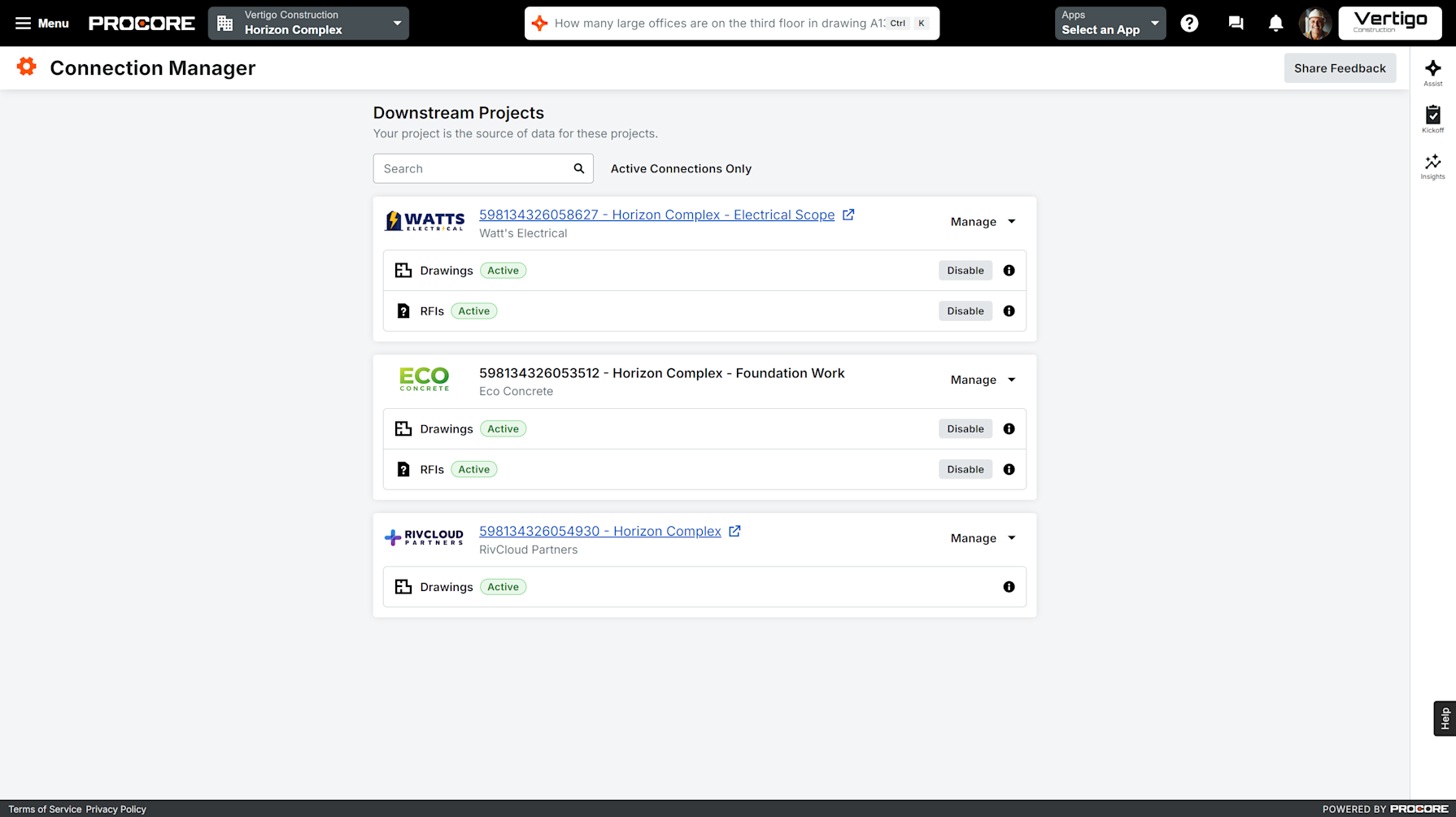
The "Connected Construction" era is here, and it starts with the Connection Manager.
Navigate to your Project Home in Procore.
Open the Connection Manager (located in the right-hand sidebar).
Invite your Partners by sending a connection request.
Enable Capabilities to choose which tools you want to sync—starting with Drawings and RFIs.
Stop switching accounts and start building together. It’s time to experience a platform that is as connected as the teams that use it.
Written by