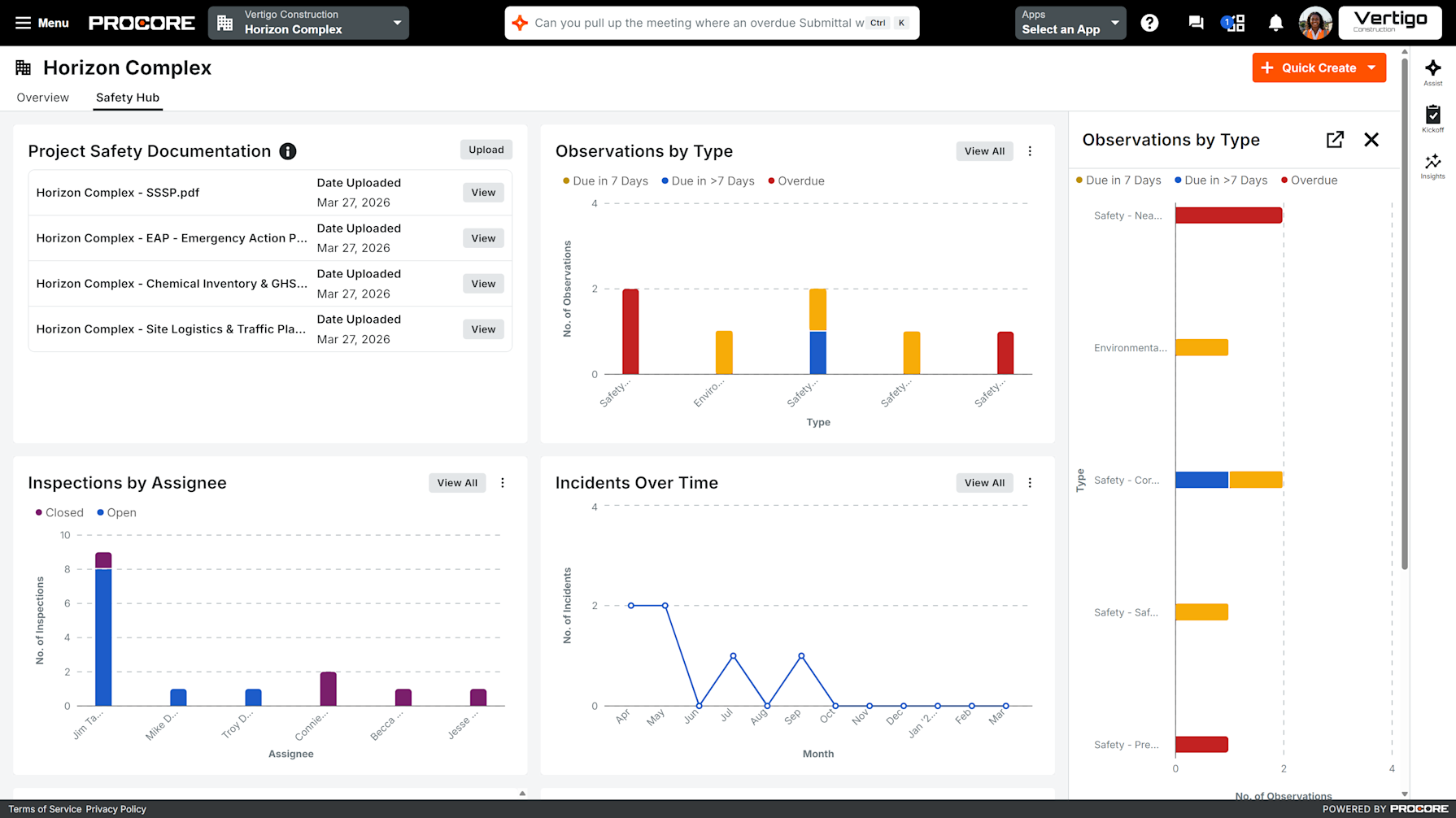
The best safety programs in construction share one thing: a team that can see risk coming before it arrives. But for most safety professionals, that clarity has been out of reach, observations in one place, inspections in another, incidents somewhere else, and no unified view of where hazards are actually accumulating across projects.
We’re excited to announce that Safety Hub is now in Open Beta via Procore Explore, a purpose-built safety experience that gives safety professionals a dedicated home in Procore, designed specifically for how safety programs actually run.
Safety Hub brings your Observations, Inspections, and Incidents into one unified space. For the first time, construction safety leaders have a command center that’s theirs: organized for prevention, not just documentation.
The Clarity to Act Before Something Goes Wrong
The construction industry has long run safety programs that were, at their core, documentation systems: capture what happened, file the report, move on. Safety Hub is built to be proactive. We believe that the most important safety data is the data you can act on before something goes wrong.
On any given morning, a Safety Director managing a dozen active projects might need to check open inspection counts in one place, pull observation trends from another, look up an incident report in a third, today they are having to do this manually all over again for every project. Safety Hub addresses that directly: safety information organized by what needs attention across all projects, not by which tool it came from or what you were able to quickly review before jumping into the day to day.
The result is a shift in how safety leaders spend their time — less navigating and compiling, more focused on the crews, projects, and conditions that need their attention most.
Safety-Only Signal Across Every Project
Here’s what that looks like in practice:
Safety gets its own home. Safety Hub introduces a dedicated space inside Procore built specifically for safety professionals — separate from project management and quality workflows, with the views, data, and navigation designed around how a safety program actually runs.
One clear view of risk across your portfolio. Safety Hub surfaces open inspections, observation trends, and incident patterns so safety leaders can see where hazards are accumulating so they can act before any risk occurs.
See it and act on it without losing your place. Drill into any card to view individual items and open them directly in the source tool, without navigating to another screen. No tab-switching, no hunting for context. The moment you spot something that needs attention, you’re one click from the work itself.
What’s Available in Open Beta
Safety Hub launches with a focused set of cards available at both the company and project level. Each card is designed around the principle that seeing a problem and acting on it should happen in the same place. Users can drill into side panels to view individual items and open them directly in the source tool without navigating away.
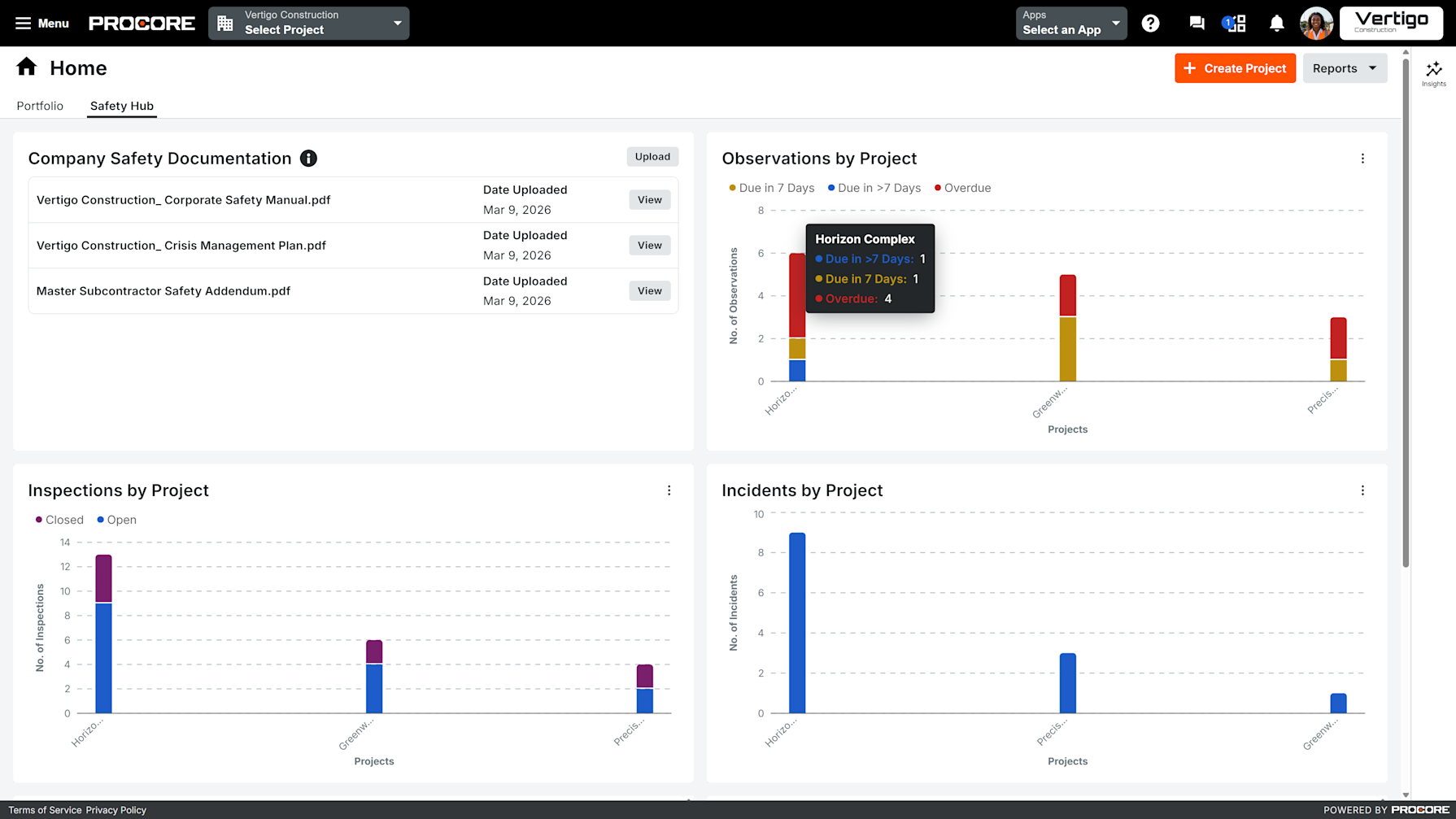
Cards available today:
Open Safety Inspections: tracks incomplete inspections by project or assignee so nothing falls through the cracks.
Safety Observations by Project/Type: surfaces observation frequency and categorization, helping safety leaders spot high-risk outliers and identify where training gaps may be developing.
Incidents by Project/Over Time: monitors total incidents with a distinction between recordable and non-recordable events, viewable by project or across a date range.
Safety SOPs: a centralized repository for company and project-level standard operating procedures, accessible directly within the hub.
Time to Complete Observations and Days Since Last Incident: available to Insights customers (via Project Execution Enterprise), these cards surface response latency and incident-free day counts to support deeper program analysis.
Safety Hub is most valuable when Procore’s core safety tools, Observations, Inspections, and Incidents are already in active use. The hub surfaces the data those tools generate. If your team is earlier in its safety journey, those are the right place to start, and Safety Hub will become more valuable over time as data is created.
How to Get Started with Safety Hub Open Beta
For existing Procore customers: Navigate to Procore Explore within your account to opt into the Safety Hub Open Beta. Once enabled, you’ll find Safety Hub in your company and/or project navigation.
Your data is already there: Your Observations, Inspections, and Incidents are already in Procore, now Safety Hub brings them together with no migration or re-entry required. Note: Observation and Inspection cards require the Quality & Safety split to be enabled. If you don't see them, contact your admin or learn how to enable the split.
Share feedback via Procore Explore: Your input directly shapes what Safety Hub looks like at General Availability. We want to hear what’s working, what’s missing, and where the experience can go further.
What’s Next for Procore Safety
Safety Hub is one of several significant investments Procore is making in our safety offering in 2026. We’re building toward a more complete, proactive safety experience — one that meets construction teams where they work and gives safety professionals the tools their programs actually require.
To learn more about what’s coming or to talk through how Safety Hub fits your organization’s safety program, reach out to your Procore account team or book a demo.
Safety Hub Open Beta is available today to all Procore customers through Procore Explore.
Written by