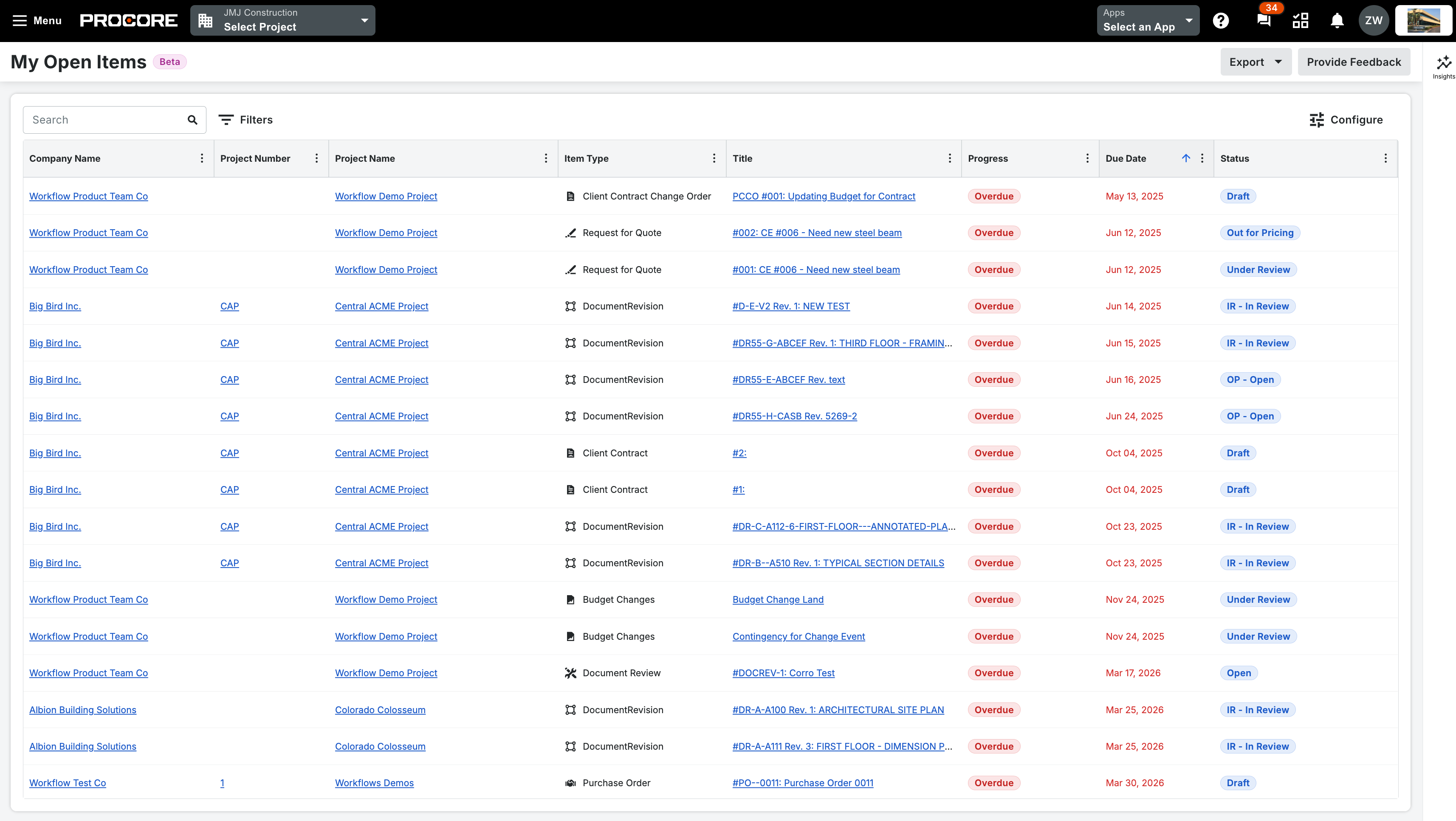
What it is: Every open item assigned to you, from every Procore company you belong to, now lives on one full-page screen. No more jumping between accounts to find what's on your plate. Filter the list by company, project, item type, or status (like Overdue or Due Today), and export it to Excel, PDF, or CSV. There's a new My Open Items icon in the top navigation bar — right by notifications — so it's one click from anywhere. Who it's for: Anyone who works across more than one Procore company — Project Managers, Specialty Contractors, Owners, and anyone juggling tasks across multiple accounts.
Why it matters: When your work is scattered across separate company accounts, things slip — you burn time switching back and forth, and deadlines hide where you can't see them. The My Open Items Workspace puts it all in one view, so you can see what's urgent, prioritize fast, and stop missing items buried in another account. Less hunting, fewer surprises, more of your day spent on the work itself.
How to get started: Click the My Open Items icon in the top navigation bar. Your full list opens automatically — use the filters to focus by company, project, type, or status, and export whenever you need a copy.
Launching July 21.